


sohan text
- codury bari bou bazar godnail narayanganj, Dhaka, Narayanganj, Bangladesh
- 01609720375

☁️ Google Drive Unlimited Storage ☁️
Item description from the seller
Google Drive Unlimited Storage
NOTE!!!
*To Ensure smooth and fast delivery, kindly leave your preferred Gmail address after payment. (Do not share your password with me)
* Activation Less then 24 Hours
* Share drives does not merge with existing 15GB storage, they are separate drives with unlimited storage
* You can use Lifetime
Visit Our Store for more great deals!

2x GOOGLE DRIVE 100 GB STORAGE *ALMACENAMIENTO 100 GB* TEAM DRIVE* LIFETIME
Item description from the seller
2x Team Drive units.
Once you receive the payment, send a message with the gmail account to which you add the news units Team Drive and in less than 24h you will have your new storage.
There is no monthly or annual payment.
They are 2 new units Team Drive storage 100 GB.
Let me know privately when you pay and provide me with your Google account (email) so I can associate the account, and get 100 Gb space or almost (400,000 files)
This storage won't merge with Google's free 15gb, it's separate storage linked to your account. It does not integrate with Google Photos, but you can upload photos manually.
You just need to provide me with your email account, no passwords or anything, just the email.
Your Google Account is not changed in any way
You can share files and folders, and have full control over what you store.
Apps that work with the 100 Gb space or nearly (400,000 files) of this offer:
Google Drive for Android and iOS
Google Drive (web)
Google Drive (web movil)
Synology Active Backup
Rclone
Plexdrive 5.1
Plex (only works when used with Google File Stream[Windows or Mac OS] or Rclone mount or Rclone cache[linux or Mac OS])
Google Drive para KODI
Synology Cloud Drive
PERL-CloudSync
Python-GoogleDrive-VideoStream (incluyendo Emby Media Server)
Google Drive API v2/v3
Insync -- as of Nov 2017, supported with one-time purchase of an Insync Team license
GoodSync
Air Explorer
Raidrive
Google-Drive-ocamlfuse (PC mounted)
Apps that will NOT work:
PlexCloud / PlexDrive 4
Google Filestream
QNAP NAS -- developer is working on support
Backup and sync (use Google File Stream App when possible)
Google Drive Sync (end of Google's life, no longer maintained and does not work)
Google Photos: You can store photos on the drive, but it is not linked to Google Photos in any way.
Google Photos iOS, android, Mac, Windows: you can't use Google Photos app, but you can upload photos with Google Drive iOS/android app
Q: I have files stored in another cloud (Microsoft OneDrive, Amazon Cloud Drive, Box, etc), how do I copy or move these files to this Google Drive Unlimited?
For Microsoft OneDrive, Amazon Cloud Drive, Box, you can use "Rclone copy" to copy from one cloud service to another cloud service. The process downloads files and reloads them, one by one. This is a process that would run on your own hardware.
Q: Can I use storage for media/video files?
Yes, you can upload media using Google Drive tools, the Google Drive website, or third-party tools. You can play video files using the Google Drive apps or website (original and transcoded versions). You can also use Google Drive for KODI (gdrive) or Python-GoogleDrive-VideoStream to play your media files on any HTML5-compatible device (computer or mobile device). You can also use Emby (Emby Media Server). For Plex Server Windows or Mac OS, Google Drive File Stream is included, so you can mount the drive on your Windows or Mac Plex Server and scrape your media files into Plex. This does not work with PlexCloud or PlexDrive.In the case of Plex Server Linux or Mac OS, you can use the Rclone mount or the Rclone cache, so that you can mount the drive on your Linux server.
Q: Can I use the space to store email?
No. The additional space is for Google Drive storage only. There will be no change to the storage of your email with gmail.
Q: Can I use the Google Photos app?
No. You can't use any of the Google Photos apps or website to store photos on your drive. You can upload photos to store on your drive using the Google Drive app, Google Drive website, or third-party apps that support Google Drive.
Q: Do I have to pay again? monthly?
It is a one-time purchase. The space is yours as long as you have your Google Account.
Q: Can I use this with a G Suite account?
Yes, G Suite accounts work best with this unit, but a G Suite account is not required.
Q: Who has access to my files?
Whichever you define in "manage members" as access. You can provide others, such as friends, family, etc., with ownership, edit or view access to your unit. No one else will have access
Q: Can I share files and folders?
You can give access to up to 600 people and they will be able to edit and view all the files. You can also give access to files and folders to anyone else (view or edit access) and you can "share with link" including sharing with the public with or without login required. If you can share entire folders.
Q: Can I use the Google Drive API with this 100 Gb space?
YES. You can use the Google Drive API v2 or v3. Any app that has been maintained by its developers in 2019 will work.
Q: Can my Google account be banned/deleted?
Your Google Account is not changed in any way. In addition, the added space is not obtained by any illegal or fraudulent method, but Google may restrict access to copyrighted files if they are shared publicly or close the space unexpectedly at any time for any reason they wish.
---------------------------------------------------------------------------------------------------------------------
2x Unidades de Team Drive.
Una vez recibido el pago, envíe un mensaje con la cuenta de gmail a la que añadir las nuevas unidades Team Drive y en menos de 24h tendrá su nuevo almacenamiento.
No hay pago mensual ni anual.
Son 2 nuevas unidades de almacenamiento Team Drive.
Avísame por privado cuando pagues y proporcionadme tu cuenta de Google (correo electrónico) para poder asociarte la cuenta, y obtener el espacio de 100 Gb o casi (400,000 archivos)
Este almacenamiento no se fusionará con el gratuito de 15gb de Google, se trata de un almacenamiento por separado vinculado a su cuenta. No se integra con Google Photos, pero se pueden subir las fotos de manera manual.
Solo necesitas proporcionarme tu cuenta de correo, sin contraseñas ni nada, solo el email.
No se modifica de ninguna manera tu cuenta de google
Puedes compartir los archivos y carpetas,y tener control total sobre lo que almacenas.
Aplicaciones que funcionan con el espacio de 100 Gb o casi (400,000 archivos) de esta oferta:
Google Drive para Android y para iOS
Google Drive (web)
Google Drive (web movil)
Synology Active Backup
Rclone
Plexdrive 5.1
Plex (sólo funciona cuando se utiliza con Google File Stream[Windows o Mac OS] o Rclone mount o Rclone cache[linux o Mac OS])
Google Drive para KODI
Synology Cloud Drive
PERL-CloudSync
Python-GoogleDrive-VideoStream (incluyendo Emby Media Server)
Google Drive API v2/v3
Insync -- as of Nov 2017, soportado con la compra única de una licencia de Team de Insync
GoodSync
Air Explorer
Raidrive
Google-Drive-ocamlfuse (montado en el PC)
Aplicaciones que NO funcionarán:
PlexCloud / PlexDrive 4
Google Filestream
QNAP NAS -- el desarrollador está trabajando en el soporte
Copias de seguridad y sincronización (utiliza Google File Stream App cuando sea posible)
Google Drive Sync (fin de la vida útil de Google, ya no se mantiene y no funciona)
Google Photos: puede almacenar fotos en la unidad, pero no está vinculada a Google Photos de ninguna manera.
Google Photos iOS, android, Mac, Windows: no se puede utilizar la aplicación Google Photos, pero se pueden subir fotos con Google Drive iOS / android app
P: Tengo archivos almacenados en otra nube (Microsoft OneDrive, Amazon Cloud Drive, Box, etc), ¿cómo puedo copiar o mover estos archivos a esta unidad de Google Drive de 100 Gb?
Para Microsoft OneDrive, Amazon Cloud Drive, Box, puedes utilizar "Rclone copy" para copiar de un servicio cloud a otro servicio cloud. El proceso descarga archivos y los recarga, uno por uno. Este es un proceso que se ejecutaría en tu propio hardware.
P: ¿Puedo utilizar el almacenamiento para archivos multimedia/de vídeo?
Sí, puedes cargar el contenido multimedia mediante las herramientas de Google Drive, el sitio web de Google Drive o las herramientas de terceros. Puedes reproducir archivos de vídeo utilizando las aplicaciones o el sitio web de Google Drive (versiones original y transcodificada). También puedes utilizar Google Drive para KODI (gdrive) o Python-GoogleDrive-VideoStream para reproducir tus archivos multimedia en cualquier dispositivo compatible con HTML5 (ordenador o dispositivo móvil). También puede utilizar Emby (Emby Media Server).
Para Plex Server Windows o Mac OS, se incluye Google Drive File Stream, para que puedas montar la unidad en tu Windows o Mac Plex Server y raspar tus archivos multimedia en Plex. Esto no funciona con PlexCloud o PlexDrive.
En el caso de Plex Server Linux o Mac OS, puede utilizar el montaje Rclone o la caché Rclone, de modo que pueda montar la unidad en tu servidor Linux.
P: ¿Puedo utilizar el espacio para almacenar el correo electrónico?
No. El espacio adicional es sólo para el almacenamiento de Google Drive. No habrá ningún cambio en el almacenamiento de tu correo electrónico con gmail.
P: ¿Puedo utilizar la aplicación Google Photos?
No. No puedes utilizar ninguna de las aplicaciones ni el sitio web de Google Photos para almacenar fotos en la unidad. Puede cargar fotos para almacenarlas en la unidad mediante la aplicación Google Drive, el sitio web de Google Drive o las aplicaciones de terceros compatibles con Google Drive.
P: ¿Tengo que pagar de nuevo? mensual?
Es una compra de un solo pago. El espacio es tuyo mientras tengas tu cuenta de Google.
P: ¿Puedo usar esto con una cuenta de G Suite?
Sí, las cuentas G Suite funcionan mejor con esta unidad, pero no se requiere una cuenta G Suite.
P: ¿Quién tiene acceso a mis archivos?
Cualquiera que tu definas en "gestionar miembros" como acceso. Puedes proporcionar a otros, como amigos, familiares, etc., la propiedad, editar o ver el acceso a su unidad. Nadie más tendrá acceso
P: ¿Puedo compartir archivos y carpetas?
Puedes dar acceso hasta 600 personas y podrán editar y ver todos los archivos. Además puedes dar acceso a archivos y carpetas a cualquier otra persona (ver o editar el acceso) y puedes "compartir con enlace" incluyendo compartir con el público con o sin login requerido. Si puedes compartir carpetas enteras.
P: ¿Puedo utilizar la API de Google Drive con este espacio ilimitado?
SÍ. Puedes utilizar la API de Google Drive API v2 o v3. Cualquier aplicación que haya sido mantenida por sus desarrolladores en 2019 funcionará.
P: ¿Puede mi cuenta de Google ser baneada / borrada?
Tu cuenta de Google no se modifica de ninguna manera. Además, el espacio añadido no se obtiene por ningún método ilegal o fraudulento, pero Google puede restringir el acceso a archivos con copyright si se comparten de forma pública o cerrar el espacio ilimitado de forma inesperada en cualquier momento por los motivos que ellos deseen.
2x Team Drive units.
Once you receive the payment, send a message with the gmail account to which you add the news units Team Drive and in less than 24h you will have your new storage.
There is no monthly or annual payment.
They are 2 new units Team Drive storage 100 GB.
Let me know privately when you pay and provide me with your Google account (email) so I can associate the account, and get 100 Gb space or almost (400,000 files)
This storage won't merge with Google's free 15gb, it's separate storage linked to your account. It does not integrate with Google Photos, but you can upload photos manually.
You just need to provide me with your email account, no passwords or anything, just the email.
Your Google Account is not changed in any way
You can share files and folders, and have full control over what you store.
Apps that work with the 100 Gb space or nearly (400,000 files) of this offer:
Google Drive for Android and iOS
Google Drive (web)
Google Drive (web movil)
Synology Active Backup
Rclone
Plexdrive 5.1
Plex (only works when used with Google File Stream[Windows or Mac OS] or Rclone mount or Rclone cache[linux or Mac OS])
Google Drive para KODI
Synology Cloud Drive
PERL-CloudSync
Python-GoogleDrive-VideoStream (incluyendo Emby Media Server)
Google Drive API v2/v3
Insync -- as of Nov 2017, supported with one-time purchase of an Insync Team license
GoodSync
Air Explorer
Raidrive
Google-Drive-ocamlfuse (PC mounted)
Apps that will NOT work:
PlexCloud / PlexDrive 4
Google Filestream
QNAP NAS -- developer is working on support
Backup and sync (use Google File Stream App when possible)
Google Drive Sync (end of Google's life, no longer maintained and does not work)
Google Photos: You can store photos on the drive, but it is not linked to Google Photos in any way.
Google Photos iOS, android, Mac, Windows: you can't use Google Photos app, but you can upload photos with Google Drive iOS/android app
Q: I have files stored in another cloud (Microsoft OneDrive, Amazon Cloud Drive, Box, etc), how do I copy or move these files to this Google Drive Unlimited?
For Microsoft OneDrive, Amazon Cloud Drive, Box, you can use "Rclone copy" to copy from one cloud service to another cloud service. The process downloads files and reloads them, one by one. This is a process that would run on your own hardware.
Q: Can I use storage for media/video files?
Yes, you can upload media using Google Drive tools, the Google Drive website, or third-party tools. You can play video files using the Google Drive apps or website (original and transcoded versions). You can also use Google Drive for KODI (gdrive) or Python-GoogleDrive-VideoStream to play your media files on any HTML5-compatible device (computer or mobile device). You can also use Emby (Emby Media Server). For Plex Server Windows or Mac OS, Google Drive File Stream is included, so you can mount the drive on your Windows or Mac Plex Server and scrape your media files into Plex. This does not work with PlexCloud or PlexDrive.In the case of Plex Server Linux or Mac OS, you can use the Rclone mount or the Rclone cache, so that you can mount the drive on your Linux server.
Q: Can I use the space to store email?
No. The additional space is for Google Drive storage only. There will be no change to the storage of your email with gmail.
Q: Can I use the Google Photos app?
No. You can't use any of the Google Photos apps or website to store photos on your drive. You can upload photos to store on your drive using the Google Drive app, Google Drive website, or third-party apps that support Google Drive.
Q: Do I have to pay again? monthly?
It is a one-time purchase. The space is yours as long as you have your Google Account.
Q: Can I use this with a G Suite account?
Yes, G Suite accounts work best with this unit, but a G Suite account is not required.
Q: Who has access to my files?
Whichever you define in "manage members" as access. You can provide others, such as friends, family, etc., with ownership, edit or view access to your unit. No one else will have access
Q: Can I share files and folders?
You can give access to up to 600 people and they will be able to edit and view all the files. You can also give access to files and folders to anyone else (view or edit access) and you can "share with link" including sharing with the public with or without login required. If you can share entire folders.
Q: Can I use the Google Drive API with this 100 Gb space?
YES. You can use the Google Drive API v2 or v3. Any app that has been maintained by its developers in 2019 will work.
Q: Can my Google account be banned/deleted?
Your Google Account is not changed in any way. In addition, the added space is not obtained by any illegal or fraudulent method, but Google may restrict access to copyrighted files if they are shared publicly or close the space unexpectedly at any time for any reason they wish.
---------------------------------------------------------------------------------------------------------------------
2x Unidades de Team Drive.
Una vez recibido el pago, envíe un mensaje con la cuenta de gmail a la que añadir las nuevas unidades Team Drive y en menos de 24h tendrá su nuevo almacenamiento.
No hay pago mensual ni anual.
Son 2 nuevas unidades de almacenamiento Team Drive.
Avísame por privado cuando pagues y proporcionadme tu cuenta de Google (correo electrónico) para poder asociarte la cuenta, y obtener el espacio de 100 Gb o casi (400,000 archivos)
Este almacenamiento no se fusionará con el gratuito de 15gb de Google, se trata de un almacenamiento por separado vinculado a su cuenta. No se integra con Google Photos, pero se pueden subir las fotos de manera manual.
Solo necesitas proporcionarme tu cuenta de correo, sin contraseñas ni nada, solo el email.
No se modifica de ninguna manera tu cuenta de google
Puedes compartir los archivos y carpetas,y tener control total sobre lo que almacenas.
Aplicaciones que funcionan con el espacio de 100 Gb o casi (400,000 archivos) de esta oferta:
Google Drive para Android y para iOS
Google Drive (web)
Google Drive (web movil)
Synology Active Backup
Rclone
Plexdrive 5.1
Plex (sólo funciona cuando se utiliza con Google File Stream[Windows o Mac OS] o Rclone mount o Rclone cache[linux o Mac OS])
Google Drive para KODI
Synology Cloud Drive
PERL-CloudSync
Python-GoogleDrive-VideoStream (incluyendo Emby Media Server)
Google Drive API v2/v3
Insync -- as of Nov 2017, soportado con la compra única de una licencia de Team de Insync
GoodSync
Air Explorer
Raidrive
Google-Drive-ocamlfuse (montado en el PC)
Aplicaciones que NO funcionarán:
PlexCloud / PlexDrive 4
Google Filestream
QNAP NAS -- el desarrollador está trabajando en el soporte
Copias de seguridad y sincronización (utiliza Google File Stream App cuando sea posible)
Google Drive Sync (fin de la vida útil de Google, ya no se mantiene y no funciona)
Google Photos: puede almacenar fotos en la unidad, pero no está vinculada a Google Photos de ninguna manera.
Google Photos iOS, android, Mac, Windows: no se puede utilizar la aplicación Google Photos, pero se pueden subir fotos con Google Drive iOS / android app
P: Tengo archivos almacenados en otra nube (Microsoft OneDrive, Amazon Cloud Drive, Box, etc), ¿cómo puedo copiar o mover estos archivos a esta unidad de Google Drive de 100 Gb?
Para Microsoft OneDrive, Amazon Cloud Drive, Box, puedes utilizar "Rclone copy" para copiar de un servicio cloud a otro servicio cloud. El proceso descarga archivos y los recarga, uno por uno. Este es un proceso que se ejecutaría en tu propio hardware.
P: ¿Puedo utilizar el almacenamiento para archivos multimedia/de vídeo?
Sí, puedes cargar el contenido multimedia mediante las herramientas de Google Drive, el sitio web de Google Drive o las herramientas de terceros. Puedes reproducir archivos de vídeo utilizando las aplicaciones o el sitio web de Google Drive (versiones original y transcodificada). También puedes utilizar Google Drive para KODI (gdrive) o Python-GoogleDrive-VideoStream para reproducir tus archivos multimedia en cualquier dispositivo compatible con HTML5 (ordenador o dispositivo móvil). También puede utilizar Emby (Emby Media Server).
Para Plex Server Windows o Mac OS, se incluye Google Drive File Stream, para que puedas montar la unidad en tu Windows o Mac Plex Server y raspar tus archivos multimedia en Plex. Esto no funciona con PlexCloud o PlexDrive.
En el caso de Plex Server Linux o Mac OS, puede utilizar el montaje Rclone o la caché Rclone, de modo que pueda montar la unidad en tu servidor Linux.
P: ¿Puedo utilizar el espacio para almacenar el correo electrónico?
No. El espacio adicional es sólo para el almacenamiento de Google Drive. No habrá ningún cambio en el almacenamiento de tu correo electrónico con gmail.
P: ¿Puedo utilizar la aplicación Google Photos?
No. No puedes utilizar ninguna de las aplicaciones ni el sitio web de Google Photos para almacenar fotos en la unidad. Puede cargar fotos para almacenarlas en la unidad mediante la aplicación Google Drive, el sitio web de Google Drive o las aplicaciones de terceros compatibles con Google Drive.
P: ¿Tengo que pagar de nuevo? mensual?
Es una compra de un solo pago. El espacio es tuyo mientras tengas tu cuenta de Google.
P: ¿Puedo usar esto con una cuenta de G Suite?
Sí, las cuentas G Suite funcionan mejor con esta unidad, pero no se requiere una cuenta G Suite.
P: ¿Quién tiene acceso a mis archivos?
Cualquiera que tu definas en "gestionar miembros" como acceso. Puedes proporcionar a otros, como amigos, familiares, etc., la propiedad, editar o ver el acceso a su unidad. Nadie más tendrá acceso
P: ¿Puedo compartir archivos y carpetas?
Puedes dar acceso hasta 600 personas y podrán editar y ver todos los archivos. Además puedes dar acceso a archivos y carpetas a cualquier otra persona (ver o editar el acceso) y puedes "compartir con enlace" incluyendo compartir con el público con o sin login requerido. Si puedes compartir carpetas enteras.
P: ¿Puedo utilizar la API de Google Drive con este espacio ilimitado?
SÍ. Puedes utilizar la API de Google Drive API v2 o v3. Cualquier aplicación que haya sido mantenida por sus desarrolladores en 2019 funcionará.
P: ¿Puede mi cuenta de Google ser baneada / borrada?
Tu cuenta de Google no se modifica de ninguna manera. Además, el espacio añadido no se obtiene por ningún método ilegal o fraudulento, pero Google puede restringir el acceso a archivos con copyright si se comparten de forma pública o cerrar el espacio ilimitado de forma inesperada en cualquier momento por los motivos que ellos deseen.

Dropbox 18 GB Lifetime Upgrade Permanent Space Friends Referral Service
Item description from the seller
Dropbox Lifetime Space
Referral Services
Upgrade your existing account up to 18GB
Upgrade your existing account through referrals, each referral adds 500 MB to your account and you can get up to 16GB (initial 2GB + 16GB bonus = Total 18GB).
YOUR ADVANTAGES:
1. Very reasonable price.
2. Short processing time.
3. No user information required.
4. No access to/examination of your data.
5. No further fees.
6. Space for lifetime
You need to send us your referral link for upgrade your existing account.
Upgrading will take around 3 to 7 days. In order to control the risk and secure the space you earned, we will gradually process it. during this time you can still use your account as normal as usual. When you receive the notification that "item is shipped" means your referral link is in processing.
NOTE:
Referrals can get you maximum 16GB extra storage. In case you've already referred some friends, my service will fill up your extra storage to the 16GB limit.
Note that it's not "increase 18GB" but "Increase to 18GB"
How to get my referral link ?
Step 1: Log in to your dropbox and get your personal referral link: dropbox.com/referrals
Step 2: Press the "Copy Link" button at the bottom of the page (See Picture 2 for details) then send it via ebay message/checkout (example link: https://db.tt/xxxxxxx)
GOOGLE DRIVE 100 GB STORAGE * ALMACENAMIENTO 100 GB * TEAM DRIVE * LIFETIME
Item description from the seller
Once you receive the payment, send a message with the gmail account to which you add the new unit Team Drive and in less than 24h you will have your new storage.
There is no monthly or annual payment.
New unit Team Drive storage 100 GB.
Let me know privately when you pay and provide me with your Google account (email) so I can associate the account, and get 100 Gb space or almost (400,000 files)
This storage won't merge with Google's free 15gb, it's separate storage linked to your account. It does not integrate with Google Photos, but you can upload photos manually.
You just need to provide me with your email account, no passwords or anything, just the email.
Your Google Account is not changed in any way
You can share files and folders, and have full control over what you store.
Apps that work with the 100 Gb space or nearly (400,000 files) of this offer:
Google Drive for Android and iOS
Google Drive (web)
Google Drive (web movil)
Synology Active Backup
Rclone
Plexdrive 5.1
Plex (only works when used with Google File Stream[Windows or Mac OS] or Rclone mount or Rclone cache[linux or Mac OS])
Google Drive para KODI
Synology Cloud Drive
PERL-CloudSync
Python-GoogleDrive-VideoStream (incluyendo Emby Media Server)
Google Drive API v2/v3
Insync -- as of Nov 2017, supported with one-time purchase of an Insync Team license
GoodSync
Air Explorer
Raidrive
Google-Drive-ocamlfuse (PC mounted)
Apps that will NOT work:
PlexCloud / PlexDrive 4
Google Filestream
QNAP NAS -- developer is working on support
Backup and sync (use Google File Stream App when possible)
Google Drive Sync (end of Google's life, no longer maintained and does not work)
Google Photos: You can store photos on the drive, but it is not linked to Google Photos in any way.
Google Photos iOS, android, Mac, Windows: you can't use Google Photos app, but you can upload photos with Google Drive iOS/android app
Q: I have files stored in another cloud (Microsoft OneDrive, Amazon Cloud Drive, Box, etc), how do I copy or move these files to this Google Drive Unlimited?
For Microsoft OneDrive, Amazon Cloud Drive, Box, you can use "Rclone copy" to copy from one cloud service to another cloud service. The process downloads files and reloads them, one by one. This is a process that would run on your own hardware.
Q: Can I use storage for media/video files?
Yes, you can upload media using Google Drive tools, the Google Drive website, or third-party tools. You can play video files using the Google Drive apps or website (original and transcoded versions). You can also use Google Drive for KODI (gdrive) or Python-GoogleDrive-VideoStream to play your media files on any HTML5-compatible device (computer or mobile device). You can also use Emby (Emby Media Server). For Plex Server Windows or Mac OS, Google Drive File Stream is included, so you can mount the drive on your Windows or Mac Plex Server and scrape your media files into Plex. This does not work with PlexCloud or PlexDrive.In the case of Plex Server Linux or Mac OS, you can use the Rclone mount or the Rclone cache, so that you can mount the drive on your Linux server.
Q: Can I use the space to store email?
No. The additional space is for Google Drive storage only. There will be no change to the storage of your email with gmail.
Q: Can I use the Google Photos app?
No. You can't use any of the Google Photos apps or website to store photos on your drive. You can upload photos to store on your drive using the Google Drive app, Google Drive website, or third-party apps that support Google Drive.
Q: Do I have to pay again? monthly?
It is a one-time purchase. The space is yours as long as you have your Google Account.
Q: Can I use this with a G Suite account?
Yes, G Suite accounts work best with this unit, but a G Suite account is not required.
Q: Who has access to my files?
Whichever you define in "manage members" as access. You can provide others, such as friends, family, etc., with ownership, edit or view access to your unit. No one else will have access
Q: Can I share files and folders?
You can give access to up to 600 people and they will be able to edit and view all the files. You can also give access to files and folders to anyone else (view or edit access) and you can "share with link" including sharing with the public with or without login required. If you can share entire folders.
Q: Can I use the Google Drive API with this 100 Gb space?
YES. You can use the Google Drive API v2 or v3. Any app that has been maintained by its developers in 2019 will work.
Q: Can my Google account be banned/deleted?
Your Google Account is not changed in any way. In addition, the added space is not obtained by any illegal or fraudulent method, but Google may restrict access to copyrighted files if they are shared publicly or close the space unexpectedly at any time for any reason they wish.
---------------------------------------------------------------------------------------------------------------------
Unidad de Team Drive.
Una vez recibido el pago, envíe un mensaje con la cuenta de gmail a la que añadir la nueva unidade Team Drive y en menos de 24h tendrá su nuevo almacenamiento.
No hay pago mensual ni anual.
Es una nueva unidade de almacenamiento Team Drive.
Avísame por privado cuando pagues y proporcionadme tu cuenta de Google (correo electrónico) para poder asociarte la cuenta, y obtener el espacio de 100 Gb o casi (400,000 archivos)
Este almacenamiento no se fusionará con el gratuito de 15gb de Google, se trata de un almacenamiento por separado vinculado a su cuenta. No se integra con Google Photos, pero se pueden subir las fotos de manera manual.
Solo necesitas proporcionarme tu cuenta de correo, sin contraseñas ni nada, solo el email.
No se modifica de ninguna manera tu cuenta de google
Puedes compartir los archivos y carpetas,y tener control total sobre lo que almacenas.
Aplicaciones que funcionan con el espacio de 100 Gb o casi (400,000 archivos) de esta oferta:
Google Drive para Android y para iOS
Google Drive (web)
Google Drive (web movil)
Synology Active Backup
Rclone
Plexdrive 5.1
Plex (sólo funciona cuando se utiliza con Google File Stream[Windows o Mac OS] o Rclone mount o Rclone cache[linux o Mac OS])
Google Drive para KODI
Synology Cloud Drive
PERL-CloudSync
Python-GoogleDrive-VideoStream (incluyendo Emby Media Server)
Google Drive API v2/v3
Insync -- as of Nov 2017, soportado con la compra única de una licencia de Team de Insync
GoodSync
Air Explorer
Raidrive
Google-Drive-ocamlfuse (montado en el PC)
Aplicaciones que NO funcionarán:
PlexCloud / PlexDrive 4
Google Filestream
QNAP NAS -- el desarrollador está trabajando en el soporte
Copias de seguridad y sincronización (utiliza Google File Stream App cuando sea posible)
Google Drive Sync (fin de la vida útil de Google, ya no se mantiene y no funciona)
Google Photos: puede almacenar fotos en la unidad, pero no está vinculada a Google Photos de ninguna manera.
Google Photos iOS, android, Mac, Windows: no se puede utilizar la aplicación Google Photos, pero se pueden subir fotos con Google Drive iOS / android app
P: Tengo archivos almacenados en otra nube (Microsoft OneDrive, Amazon Cloud Drive, Box, etc), ¿cómo puedo copiar o mover estos archivos a esta unidad de Google Drive de 100 Gb?
Para Microsoft OneDrive, Amazon Cloud Drive, Box, puedes utilizar "Rclone copy" para copiar de un servicio cloud a otro servicio cloud. El proceso descarga archivos y los recarga, uno por uno. Este es un proceso que se ejecutaría en tu propio hardware.
P: ¿Puedo utilizar el almacenamiento para archivos multimedia/de vídeo?
Sí, puedes cargar el contenido multimedia mediante las herramientas de Google Drive, el sitio web de Google Drive o las herramientas de terceros. Puedes reproducir archivos de vídeo utilizando las aplicaciones o el sitio web de Google Drive (versiones original y transcodificada). También puedes utilizar Google Drive para KODI (gdrive) o Python-GoogleDrive-VideoStream para reproducir tus archivos multimedia en cualquier dispositivo compatible con HTML5 (ordenador o dispositivo móvil). También puede utilizar Emby (Emby Media Server).
Para Plex Server Windows o Mac OS, se incluye Google Drive File Stream, para que puedas montar la unidad en tu Windows o Mac Plex Server y raspar tus archivos multimedia en Plex. Esto no funciona con PlexCloud o PlexDrive.
En el caso de Plex Server Linux o Mac OS, puede utilizar el montaje Rclone o la caché Rclone, de modo que pueda montar la unidad en tu servidor Linux.
P: ¿Puedo utilizar el espacio para almacenar el correo electrónico?
No. El espacio adicional es sólo para el almacenamiento de Google Drive. No habrá ningún cambio en el almacenamiento de tu correo electrónico con gmail.
P: ¿Puedo utilizar la aplicación Google Photos?
No. No puedes utilizar ninguna de las aplicaciones ni el sitio web de Google Photos para almacenar fotos en la unidad. Puede cargar fotos para almacenarlas en la unidad mediante la aplicación Google Drive, el sitio web de Google Drive o las aplicaciones de terceros compatibles con Google Drive.
P: ¿Tengo que pagar de nuevo? mensual?
Es una compra de un solo pago. El espacio es tuyo mientras tengas tu cuenta de Google.
P: ¿Puedo usar esto con una cuenta de G Suite?
Sí, las cuentas G Suite funcionan mejor con esta unidad, pero no se requiere una cuenta G Suite.
P: ¿Quién tiene acceso a mis archivos?
Cualquiera que tu definas en "gestionar miembros" como acceso. Puedes proporcionar a otros, como amigos, familiares, etc., la propiedad, editar o ver el acceso a su unidad. Nadie más tendrá acceso
P: ¿Puedo compartir archivos y carpetas?
Puedes dar acceso hasta 600 personas y podrán editar y ver todos los archivos. Además puedes dar acceso a archivos y carpetas a cualquier otra persona (ver o editar el acceso) y puedes "compartir con enlace" incluyendo compartir con el público con o sin login requerido. Si puedes compartir carpetas enteras.
P: ¿Puedo utilizar la API de Google Drive con este espacio ilimitado?
SÍ. Puedes utilizar la API de Google Drive API v2 o v3. Cualquier aplicación que haya sido mantenida por sus desarrolladores en 2019 funcionará.
P: ¿Puede mi cuenta de Google ser baneada / borrada?
Tu cuenta de Google no se modifica de ninguna manera. Además, el espacio añadido no se obtiene por ningún método ilegal o fraudulento, pero Google puede restringir el acceso a archivos con copyright si se comparten de forma pública o cerrar el espacio ilimitado de forma inesperada en cualquier momento por los motivos que ellos deseen.

Google Drive 100GB Storage Genuine Share drive Lifetime
Item description from the seller
Google Drive 100GB Storage
NOTE!!!
*To Ensure smooth and fast delivery, kindly leave your preferred Gmail address after payment. (Do not share your password with me)
* Activation Less then 24 Hours
* Share drives does not merge with existing 15GB storage, they are separate drives with 100GB storage
* You can use Lifetime
Visit Our Store for more great deals!
GOOGLE DRIVE STORAGE 100GB * STORAGE 100GB * TEAM DRIVE * LIFETIME
Item description from the seller
Unidad de Team Drive.
Una vez recibido el pago, envíe un mensaje con la cuenta de gmail a la que añadir la nueva unidade Team Drive y en menos de 24h tendrá su nuevo almacenamiento.
No hay pago mensual ni anual.
Nueva unidade de almacenamiento Team Drive.
Avísame por privado cuando pagues y proporcionadme tu cuenta de Google (correo electrónico) para poder asociarte la cuenta, y obtener el espacio de 100 Gb o 400,000 archivos.
Este almacenamiento no se fusionará con el gratuito de 15gb de Google, se trata de un almacenamiento por separado vinculado a su cuenta. No se integra con Google Photos, pero se pueden subir las fotos de manera manual.
Solo necesitas proporcionarme tu cuenta de correo, sin contraseñas ni nada, solo el email.
No se modifica de ninguna manera tu cuenta de google
Puedes compartir los archivos y carpetas,y tener control total sobre lo que almacenas.
Aplicaciones que funcionan con el espacio de 100 Gb o 400,000 archivos de esta oferta:
Google Drive para Android y para iOS
Google Drive (web)
Google Drive (web movil)
Synology Active Backup
Rclone
Plexdrive 5.1
Plex (sólo funciona cuando se utiliza con Google File Stream[Windows o Mac OS] o Rclone mount o Rclone cache[linux o Mac OS])
Google Drive para KODI
Synology Cloud Drive
PERL-CloudSync
Python-GoogleDrive-VideoStream (incluyendo Emby Media Server)
Google Drive API v2/v3
Insync -- as of Nov 2017, soportado con la compra única de una licencia de Team de Insync
GoodSync
Air Explorer
Raidrive
Google-Drive-ocamlfuse (montado en el PC)
Aplicaciones que NO funcionarán:
PlexCloud / PlexDrive 4
Google Filestream
QNAP NAS -- el desarrollador está trabajando en el soporte
Copias de seguridad y sincronización (utiliza Google File Stream App cuando sea posible)
Google Drive Sync (fin de la vida útil de Google, ya no se mantiene y no funciona)
Google Photos: puede almacenar fotos en la unidad, pero no está vinculada a Google Photos de ninguna manera.
Google Photos iOS, android, Mac, Windows: no se puede utilizar la aplicación Google Photos, pero se pueden subir fotos con Google Drive iOS / android app
P: Tengo archivos almacenados en otra nube (Microsoft OneDrive, Amazon Cloud Drive, Box, etc), ¿cómo puedo copiar o mover estos archivos a esta unidad de Google Drive de 100 Gb?
Para Microsoft OneDrive, Amazon Cloud Drive, Box, puedes utilizar "Rclone copy" para copiar de un servicio cloud a otro servicio cloud. El proceso descarga archivos y los recarga, uno por uno. Este es un proceso que se ejecutaría en tu propio hardware.
P: ¿Puedo utilizar el almacenamiento para archivos multimedia/de vídeo?
Sí, puedes cargar el contenido multimedia mediante las herramientas de Google Drive, el sitio web de Google Drive o las herramientas de terceros. Puedes reproducir archivos de vídeo utilizando las aplicaciones o el sitio web de Google Drive (versiones original y transcodificada). También puedes utilizar Google Drive para KODI (gdrive) o Python-GoogleDrive-VideoStream para reproducir tus archivos multimedia en cualquier dispositivo compatible con HTML5 (ordenador o dispositivo móvil). También puede utilizar Emby (Emby Media Server).
Para Plex Server Windows o Mac OS, se incluye Google Drive File Stream, para que puedas montar la unidad en tu Windows o Mac Plex Server y raspar tus archivos multimedia en Plex. Esto no funciona con PlexCloud o PlexDrive.
En el caso de Plex Server Linux o Mac OS, puede utilizar el montaje Rclone o la caché Rclone, de modo que pueda montar la unidad en tu servidor Linux.
P: ¿Puedo utilizar el espacio para almacenar el correo electrónico?
No. El espacio adicional es sólo para el almacenamiento de Google Drive. No habrá ningún cambio en el almacenamiento de tu correo electrónico con gmail.
P: ¿Puedo utilizar la aplicación Google Photos?
No. No puedes utilizar ninguna de las aplicaciones ni el sitio web de Google Photos para almacenar fotos en la unidad. Puede cargar fotos para almacenarlas en la unidad mediante la aplicación Google Drive, el sitio web de Google Drive o las aplicaciones de terceros compatibles con Google Drive.
P: ¿Tengo que pagar de nuevo? mensual?
Es una compra de un solo pago. El espacio es tuyo mientras tengas tu cuenta de Google.
P: ¿Puedo usar esto con una cuenta de G Suite?
Sí, las cuentas G Suite funcionan mejor con esta unidad, pero no se requiere una cuenta G Suite.
P: ¿Quién tiene acceso a mis archivos?
Cualquiera que tu definas en "gestionar miembros" como acceso. Puedes proporcionar a otros, como amigos, familiares, etc., la propiedad, editar o ver el acceso a su unidad. Nadie más tendrá acceso
P: ¿Puedo compartir archivos y carpetas?
Puedes dar acceso hasta 600 personas y podrán editar y ver todos los archivos. Además puedes dar acceso a archivos y carpetas a cualquier otra persona (ver o editar el acceso) y puedes "compartir con enlace" incluyendo compartir con el público con o sin login requerido. Si puedes compartir carpetas enteras.
P: ¿Puedo utilizar la API de Google Drive con este espacio ilimitado?
SÍ. Puedes utilizar la API de Google Drive API v2 o v3. Cualquier aplicación que haya sido mantenida por sus desarrolladores en 2019 funcionará.
P: ¿Puede mi cuenta de Google ser baneada / borrada?
Tu cuenta de Google no se modifica de ninguna manera. Además, el espacio añadido no se obtiene por ningún método ilegal o fraudulento, pero Google puede restringir el acceso a archivos con copyright si se comparten de forma pública o cerrar el espacio ilimitado de forma inesperada en cualquier momento por los motivos que ellos deseen.
---------------------------------------------------------------------------------------------------------------------
Once you receive the payment, send a message with the gmail account to which you add the new unit Team Drive and in less than 24h you will have your new storage.
There is no monthly or annual payment.
New unit Team Drive storage 100 GB.
Let me know privately when you pay and provide me with your Google account (email) so I can associate the account, and get 100 Gb space or 400,000 files.
This storage won't merge with Google's free 15gb, it's separate storage linked to your account. It does not integrate with Google Photos, but you can upload photos manually.
You just need to provide me with your email account, no passwords or anything, just the email.
Your Google Account is not changed in any way
You can share files and folders, and have full control over what you store.
Apps that work with the 100 Gb space or 400,000 files of this offer:
Google Drive for Android and iOS
Google Drive (web)
Google Drive (web movil)
Synology Active Backup
Rclone
Plexdrive 5.1
Plex (only works when used with Google File Stream[Windows or Mac OS] or Rclone mount or Rclone cache[linux or Mac OS])
Google Drive para KODI
Synology Cloud Drive
PERL-CloudSync
Python-GoogleDrive-VideoStream (incluyendo Emby Media Server)
Google Drive API v2/v3
Insync -- as of Nov 2017, supported with one-time purchase of an Insync Team license
GoodSync
Air Explorer
Raidrive
Google-Drive-ocamlfuse (PC mounted)
Apps that will NOT work:
PlexCloud / PlexDrive 4
Google Filestream
QNAP NAS -- developer is working on support
Backup and sync (use Google File Stream App when possible)
Google Drive Sync (end of Google's life, no longer maintained and does not work)
Google Photos: You can store photos on the drive, but it is not linked to Google Photos in any way.
Google Photos iOS, android, Mac, Windows: you can't use Google Photos app, but you can upload photos with Google Drive iOS/android app
Q: I have files stored in another cloud (Microsoft OneDrive, Amazon Cloud Drive, Box, etc), how do I copy or move these files to this Google Drive Unlimited?
For Microsoft OneDrive, Amazon Cloud Drive, Box, you can use "Rclone copy" to copy from one cloud service to another cloud service. The process downloads files and reloads them, one by one. This is a process that would run on your own hardware.
Q: Can I use storage for media/video files?
Yes, you can upload media using Google Drive tools, the Google Drive website, or third-party tools. You can play video files using the Google Drive apps or website (original and transcoded versions). You can also use Google Drive for KODI (gdrive) or Python-GoogleDrive-VideoStream to play your media files on any HTML5-compatible device (computer or mobile device). You can also use Emby (Emby Media Server). For Plex Server Windows or Mac OS, Google Drive File Stream is included, so you can mount the drive on your Windows or Mac Plex Server and scrape your media files into Plex. This does not work with PlexCloud or PlexDrive.In the case of Plex Server Linux or Mac OS, you can use the Rclone mount or the Rclone cache, so that you can mount the drive on your Linux server.
Q: Can I use the space to store email?
No. The additional space is for Google Drive storage only. There will be no change to the storage of your email with gmail.
Q: Can I use the Google Photos app?
No. You can't use any of the Google Photos apps or website to store photos on your drive. You can upload photos to store on your drive using the Google Drive app, Google Drive website, or third-party apps that support Google Drive.
Q: Do I have to pay again? monthly?
It is a one-time purchase. The space is yours as long as you have your Google Account.
Q: Can I use this with a G Suite account?
Yes, G Suite accounts work best with this unit, but a G Suite account is not required.
Q: Who has access to my files?
Whichever you define in "manage members" as access. You can provide others, such as friends, family, etc., with ownership, edit or view access to your unit. No one else will have access
Q: Can I share files and folders?
You can give access to up to 600 people and they will be able to edit and view all the files. You can also give access to files and folders to anyone else (view or edit access) and you can "share with link" including sharing with the public with or without login required. If you can share entire folders.
Q: Can I use the Google Drive API with this 100 Gb space?
YES. You can use the Google Drive API v2 or v3. Any app that has been maintained by its developers in 2019 will work.
Q: Can my Google account be banned/deleted?
Your Google Account is not changed in any way. In addition, the added space is not obtained by any illegal or fraudulent method, but Google may restrict access to copyrighted files if they are shared publicly or close the space unexpectedly at any time for any reason they wish.

Google Drive Unlimited [IT] – 100% Satisfied or Refunded-
Item description from the seller
Google Drive Unlimited Forever [IT] - Google drive per sempre[ITALIA]
Facile, veloce e sicuro.
Dimensione: 100Gb
Consegna rapida
Contattare il venditore per ricevere il prodotto oppure specificare l'account (indirizzo gmail) al quale inviare il prodotto nelle note dell'ordine
Pagamento PAYPAL disponibile
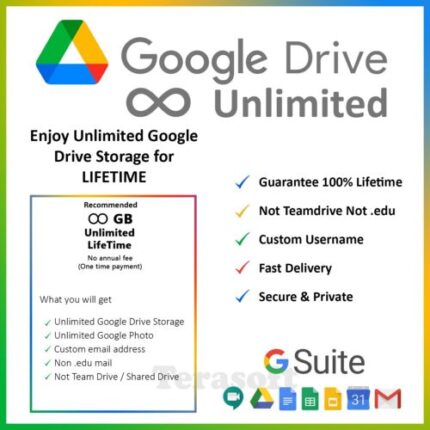
Google Drive Unlimited Storage Account
Item description from the seller
Product details of Google Suite Unlimited Storage.
✅ Can change password at any time.
✅ No monthly or yearly payments.
✅ Account active forever.
✅ [NOT TEAM DRIVE] [NOT . EDU].
✅ UNLIMITED Sharing with your friends and family.
✅ UNLIMITED Space of Gmail account.
✅ UNLIMITED Space of Google Photo.
✅ UNLIMITED Space of Google Drive Account.
✅ Unmetered Download and Upload (Maximum 5TB per file)
To Ensure smooth and fast delivery, kindly leave below details after payment.
Your name –
Username - (A name you like)
Gmail address -
NOTE:
.::WE'RE NOT UPGRADING YOUR CURRENT ACCOUNT STORAGE. WE'LL GIVE A NEW ACCOUNT TO YOU::.
Visit Our Store for more great deals!


Google Play Gift Card 10 Rupee( India )
Google Play Gift Card buy Bkash
You can gift cards buy from us at a cheap rate. You can buy all google play gift cards from us at the very lowest price in Bangladesh. we are providing you Google Play Gift Card with Bkash.
300USD Direct account reloads for Google Play. You will get the balance directly in your google account.
If you purchase this product, You are required to provide:
a. Your Gmail id
b. Your Gmail password
Note: You are required to turn off your two-step verification.
Loading takes from 30 mins to 3 hours. If we need more time, we will contact you at your provided number.
GET GOOGLE GIFT CARDS FAST BY DIGITAL DELIVERY
Available now for use on the web and on Android devices, Google Play Gift Cards are a great way to show your appreciation, treat someone special, or reward yourself. These versatile gift cards can be redeemed in the Google Play Store and used just like cash towards the purchase of apps, movies, e-books, and more.
Give the Gift of Books, Music, Movies, Games and More
Google Play Store gift cards have always been one of the simplest ways to give a gift, but now the process is even simpler with fast and reliable email delivery. Whether you are purchasing it for yourself or as a gift for someone special, you can use the email delivery function to send the gift card codes to any email address, where it can be redeemed to the recipient’s account with a single click.
Bring Out Your Playful Side
The Play store is a simple one-stop-shop for Android compatible apps, e-books, music, and more. Once they have been redeemed, The best part is that these versatile Android gift cards never expire, and can be used at any time on any purchase.
Browse and Buy
Whether you have an Android tablet, a smartphone, or a computer, you can buy music, movies, and more, and your purchases can be shared across all of your devices so that you can enjoy your purchase wherever you go. Gift cards make it easy to put money in your digital wallet and keep it safe until you’re ready to purchase. Google Play Store cards can be used along with other funds to purchase whatever you please, whenever you please. Show someone that you’re thinking of them, reward a special effort, or just brighten someone’s day with the easy convenience and versatility of an Android gift card for the Google Play Store.

Google Play Gift Card 100 Usd (USA)
Google Play Gift Card buy Bkash
You can gift cards buy from us at a cheap rate. You can buy all google play gift cards from us at the very lowest price in Bangladesh. we are providing you Google Play Gift Card with Bkash.
300USD Direct account reloads for Google Play. You will get the balance directly in your google account.
If you purchase this product, You are required to provide:
a. Your Gmail id
b. Your Gmail password
Note: You are required to turn off your two-step verification.
Loading takes from 30 mins to 3 hours. If we need more time, we will contact you at your provided number.
GET GOOGLE GIFT CARDS FAST BY DIGITAL DELIVERY
Available now for use on the web and on Android devices, Google Play Gift Cards are a great way to show your appreciation, treat someone special, or reward yourself. These versatile gift cards can be redeemed in the Google Play Store and used just like cash towards the purchase of apps, movies, e-books, and more.
Give the Gift of Books, Music, Movies, Games and More
Google Play Store gift cards have always been one of the simplest ways to give a gift, but now the process is even simpler with fast and reliable email delivery. Whether you are purchasing it for yourself or as a gift for someone special, you can use the email delivery function to send the gift card codes to any email address, where it can be redeemed to the recipient’s account with a single click.
Bring Out Your Playful Side
The Play store is a simple one-stop-shop for Android compatible apps, e-books, music, and more. Once they have been redeemed, The best part is that these versatile Android gift cards never expire, and can be used at any time on any purchase.
Browse and Buy
Whether you have an Android tablet, a smartphone, or a computer, you can buy music, movies, and more, and your purchases can be shared across all of your devices so that you can enjoy your purchase wherever you go. Gift cards make it easy to put money in your digital wallet and keep it safe until you’re ready to purchase. Google Play Store cards can be used along with other funds to purchase whatever you please, whenever you please. Show someone that you’re thinking of them, reward a special effort, or just brighten someone’s day with the easy convenience and versatility of an Android gift card for the Google Play Store.